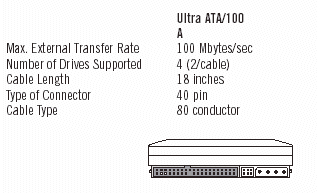
 Saegate ATA 詳細情報
http://www.seagate-asia.com/sgt/japan/discsupport.jsp
http://www.seagate.com/support/kb/disc/eide.html
http://www.seagate.com/support/disc/specs/interface_ata_st3.html
ATA Jumper Settings
The current U-Series and Barracuda ATA drive families follow the jumper configuration
noted below. If you have an older drive please visit our Disc Drive Encyclopedia
and find your model number for details on jumper configuration.

Cable Select. The drive is configured at the factory for a cable select setting. This allows the drive to assume the proper role of master or slave based on the connector used on the cable (see the UltraATA cable figure below). For the cable select setting to work properly, the cables you are using must support the cable select feature. Current UltraATA cables with the 3 colored connectors do support this feature.
Master or single drive. If you are installing your Seagate hard drive as the only drive in the system or if it will be the primary boot drive for the system, the jumper should be set on pins 7 and 8.
Drive as slave. If you are installing the drive as an additional drive in your system, the drive should be set as slave by removing all jumpers. Remember to confirm that the original drive is set to a master position (If the limit capacity jumper is required for your installation it will need to remain in place).
Drive as master with a non-ATA-compatible slave. Set a jumper on pins 5 and 6 and a jumper on pins 7 and 8. Use this jumper setting only if the drive does not work as a master.
Limit drive capacity. Use this when either you start up your computer and see the message, "Hard disc drive controller failure", your computer does not recognize your newly installed hard drive, or your system stops responding during the boot process after installing this new drive.
This occurs in some computers that do not support high-capacity drives. To address this problem, install the capacity-limiting jumper on your new hard drive, as shown in the figure above (this will not affect the storage capacity of your drive).
After setting the capacity-limiting jumper, run DiscWizard Starter Edition to allow your computer to recognize the full capacity of the drive.
We recommend the use of newer UltraATA 66/100 cables to achieve the best performance from your new Seagate hard drive. These UltraATA cables have 3 colored connectors, each connector has a specific purpose. Be sure to plug the correct connector into the correct device.
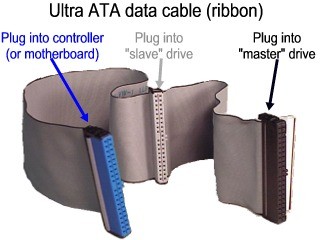
- The blue connector is for your host bus adapter (using a connector on your motherboard).
- The black connector at the other end is for your master device, usually the hard drive you boot from.
- The gray connector is for an optional slave device if you have a second hard drive.
- Other devices like CD-ROM drives, tape drives and CD burners are usually
plugged into a separate cable which also connects to the motherboard.
DOSまたはWindows 95でのシングルATAハード・ドライブの取り付け
http://www.seagate.com/support/disc/manuals/ata/d1153r17.pdf